• HEXUS
  • HEXUS.tv
  • channel
  • gaming
  • lifestyle
  • trust
  • community
  • ESReality
  • HEXUS.community discussion forums

    Welcome to the HEXUS.community discussion forums.

    You are currently viewing our boards as a guest which gives you limited access to view most discussions and other features. By joining our free community you will have access to post topics, respond to polls and access many other special features. Registration is fast, simple and absolutely free so please, join our community today!
    Go Back   HEXUS.community discussion forums > HEXUS.help - buying advice & technical queries > HEXUS.hardware > Chassis & system 'modding'

    Chassis & system 'modding' Get in here, with projects and discussions about new cases and see other peoples ideas and concepts

    Reply
     
    LinkBack Thread Tools
    Old 26-10-2008, 11:09 PM   #1 (permalink)
    Senior Member
     
    Pob255's Avatar
     
    Join Date: Apr 2007
    Location: London
    Posts: 5,460
    Thanks: 247
    Thanked 490 Times in 458 Posts
    Pob255's system
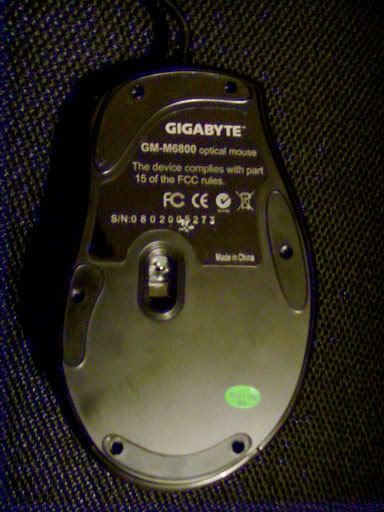
    Gigabyte GM-M6800 mouse modding

    For thoes of you who's missed it, the gigabyte GM-M6800 mouse is a dirt cheap optical mouse, with two speed setting and 2 side buttons.
    Personally I think it's a nice shape and fit my hand quite well.

    Gigabyte GM-M6800 Dual Lens Gaming Mouse £6.99 delivered

    The down sides was an overall light weight and cheap feel, so I've had a go at modding it.

    Oh and Apologies for the bad photo's, energy effecent light bulbs,black plastic and digital cameras just never seem to work well together.

    Part 1: Skinning a mouse.

    For anyone who's never opened up a mouse before it's fairly easy, there well be one or more screws on the bottom, for which you'll need a thin crosspoint screwdriver, jeweller type as a standard screwdriver head is too thick to allow access to the sunk screws.

    Now normally (infact on every other mouse I've opened) the screw is ether exposed or hidden under the serial number/information sticker.
    Simple way to locate such a hidden screw is just to run the tip of the screwdriver over the sticker untill it "dips" in and there is the screw.
    I did the same on this mouse found a dip of about the correct size, however after carefully cutting open the sticker I found it's a moulding point This is a bit odd as moulding points are normally on the inside.

    I next peeled away one of the side rubber panels on a hunch, there are a few small square holes under it and I got a bad feeling that this mouse might be held together by plastic clips and not screw was involved, which would make it next to impossible to open without breaking.

    Luckly the is not the case, which I discovered when I peeled away one of the feet, there are infact 6 screws in total, 2 under both the top and bottom feet and 1 each under the left and right feet.


    No you only need to remove the top two and bottom two at first, these screws hold in the top section.

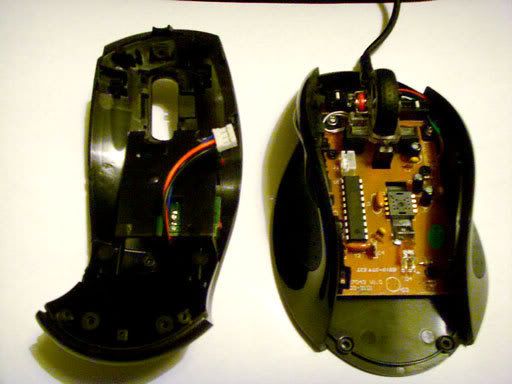
    ok not easy to see here but the top is actually made up of two peices sandwiched together.
    and held together by one screw (which can just been seen below the wire)
    the curcit board sandwiched between the two parts has the microswitchs for the side buttons and the speed button, it's held on to the lower part by a couple of screws (I didn't try to remove it)

    The two side sections are held on by both the single screw on the bottom and a single screw on the inside near the front.

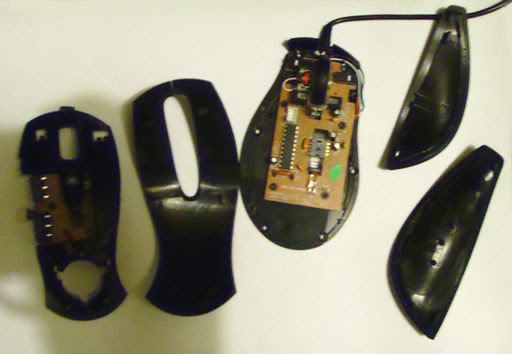
    Here it is broken down into all 4 parts.


    I had a go at removeing the main curcit board which is held on by 4 screws, however before you can take that off you need to remove the wheel section and I couldn't get to off.
    The wheel section is held in by a plastic pin at the front, which I could detach and a clip arrangement at the back which I could not realease and didn't want to break it so for now I gave up.
    Pob255 is offline   Reply With Quote
    Received thanks from:
    Mithrandir (27-10-2008), RoBe (27-10-2008)
    Old 26-10-2008, 11:10 PM   #2 (permalink)
    Senior Member
     
    Pob255's Avatar
     
    Join Date: Apr 2007
    Location: London
    Posts: 5,460
    Thanks: 247
    Thanked 490 Times in 458 Posts
    Pob255's system
    Re: Gigabyte GM-M6800 mouse modding

    Part 2: modding, adding weight and padding.

    What I wanted to do with this mouse was add a bit of wight and try to reduce the hollow sound if you tap it.

    I used some more of my very handy left over Paxmate sound damping foam cutting up small bits and covering the lower half of the inside of the top section.
    Basically covering all of it from the point where the plastic thins to allow the front buttons to be depressed more easily all the way to the back, leaveing clear areas around any plastic tab or screw hole, so as not to get in the way when I had to put the two halves back together.
    I didn't cover the front section incase it disrupted mouse clicking.

    Sorry forgot to get a photo of this

    Even though I had left spaces round the tabs and screw holes the padding was still too thick and while it would go back together, when I aligned the side peices up the top section was still sticking up a good half mm or so.
    In the end I had to rip off most of the foam to reduce it's thickness to get the two halves back together snugly.

    on a side note, there is a hole on the rear of the lower section that looks like it's designed for a badge to sit in, being sandwiched between the two sections if the outter section had a corresponding hole.
    Which this mouse does not.


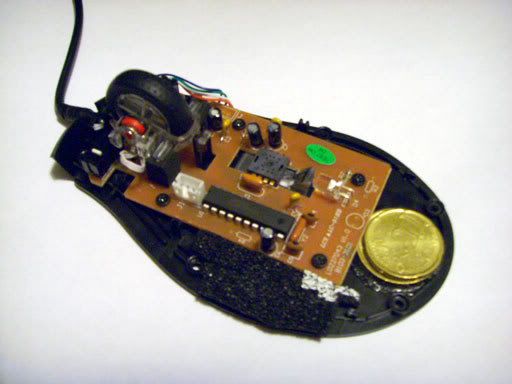
    Next I glued in two coins I happened to have laying about to add some weight to the base.

    It's a 50cent € and a 20cent €, with a combined weight of three quarters of an ounce
    You can also spot a couple of bits of pzxmate I stuck on while checking clearence on the side section.

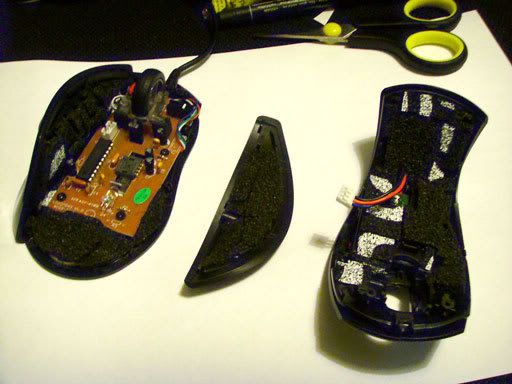
    I continued adding Paxmate to teh inside of all the sections, creafully checking for clearence and makeing sure I didn't block anything. (esp after the problems I had getting the top back together)

    Here it is ready to go back together


    Now it's all back together I didn't bother with another pic as from the outside it still looks the same.
    The weight of the mouse, without wire, has gone from 4 ounces to 5 ounces ( yep that's a full quarter ounce of Paxmate )
    The differnce in weight, while small, is a noticeable improvement to the overall feel.
    I would of liked another 0.5-1 ounce addition, however I did not want to add too much to the rear of the mouse and unballance it.
    The Paxmate stuffing has greatly reduced the hollow sound and while I know it's structually no different, it "feels" more solid in my hand.

    All told a simple mod which has improved the feel of this cheap mouse, I'm currently thinking of seeing if there's something I could use to cover the surface of the top section to improve the feel of surface.

    I'd love to do something to give it a rubberised feel, just no idea what as yet I'll add more if I figure something out.

    Well I hope you enjoyed it, now go get a screw driver and skin your mouse

    Last edited by Pob255; 26-10-2008 at 11:50 PM.
    Pob255 is offline   Reply With Quote
    Received thanks from:
    Hicks12 (26-10-2008), Mithrandir (27-10-2008)
    Old 27-10-2008, 09:33 AM   #3 (permalink)
    Ban Hammer!
     
    Pingu2003's Avatar
     
    Join Date: Jul 2003
    Posts: 2,646
    Thanks: 53
    Thanked 178 Times in 67 Posts
    Re: Gigabyte GM-M6800 mouse modding

    lol had it 2 days and already looking to destroy it
    Pingu2003 is offline   Reply With Quote
    Old 27-10-2008, 11:01 AM   #4 (permalink)
    Senior Member
     
    Pob255's Avatar
     
    Join Date: Apr 2007
    Location: London
    Posts: 5,460
    Thanks: 247
    Thanked 490 Times in 458 Posts
    Pob255's system
    Re: Gigabyte GM-M6800 mouse modding

    Well less than 36hours

    Any idea where I could find this Plasti Dip or simular?

    EDIT: must google before posting
    Yes it's www.plastidip.co.uk

    Has anyone used this stuff before?
    http://www.plastidip.co.uk/index2.cf...ducts&prodId=1

    EDIT2: they've even got an ebay shop under the name plastidipukltd

    Last edited by Pob255; 27-10-2008 at 11:21 AM.
    Pob255 is offline   Reply With Quote
    Old 27-10-2008, 01:41 PM   #5 (permalink)
    Ban Hammer!
     
    Pingu2003's Avatar
     
    Join Date: Jul 2003
    Posts: 2,646
    Thanks: 53
    Thanked 178 Times in 67 Posts
    Re: Gigabyte GM-M6800 mouse modding

    well you inspired me, ive modded both my cheap mice, put 6p in one and 12p in another (in pennies)

    feels nice and heavy now lol
    Pingu2003 is offline   Reply With Quote
    Old 25-08-2009, 08:53 PM   #6 (permalink)
    Senior Member
     
    Pob255's Avatar
     
    Join Date: Apr 2007
    Location: London
    Posts: 5,460
    Thanks: 247
    Thanked 490 Times in 458 Posts
    Pob255's system
    Re: Gigabyte GM-M6800 mouse modding

    Cross threading here.

    As part of project Spork, I've decided to give up this mouse and so I've repainted it.

    Project: Spork

    Damb but it's looking sexy now


    Come Join the case modding contest, it's fun and therapeutic, go on you know you want too.
    "Are you suggesting that I can't punch an entire dimension into submission?" - Flying squirrel - The Red Panda Adventures
    Pob255 is offline   Reply With Quote
    Reply

    Breadcrumb
    Go Back   HEXUS.community discussion forums > HEXUS.help - buying advice & technical queries > HEXUS.hardware > Chassis & system 'modding'


    Currently Active Users Viewing This Thread: 1 (0 members and 1 guests)
     
    Thread Tools

    Posting Rules
    You may not post new threads
    You may not post replies
    You may not post attachments
    You may not edit your posts

    BB code is On
    Smilies are On
    [IMG] code is On
    HTML code is Off
    Trackbacks are On
    Pingbacks are On
    Refbacks are On


    Similar Threads
    Thread Thread Starter Forum Replies Last Post
    Cyber Snipa Stinger Gaming Mouse shadowmaster Reader reviews 8 20-02-2010 08:22 PM
    Apple: New Multi button mouse shocker Gordy Apple Mac 17 03-08-2005 10:51 PM
    IceMat - Second Edition autopilot Reader reviews 5 12-02-2005 07:44 AM
    Logitech MX700 Cordless Mouse Lee @ SCAN Reader reviews 0 04-12-2004 11:23 AM
    Razor Boomslang 2100. Stewart Reader reviews 0 30-08-2004 05:32 PM


    All times are GMT. The time now is 06:33 AM.

    Any representations/statements made on the HEXUS.community discussion forums are the representations/statements of the author i.e. the person/organisation making them. If any such representations/statements are disputed they are a matter between the parties concerned.
    HEXUS Limited accepts no responsibility for any misrepresentations, inaccurate or false statements made by any person/organisation other than HEXUS Limited employees.
    For more information please read HEXUS Limited's terms, conditions and privacy policy.

    Hosted Exchange | Virtual Dedicated Server

    Powered by vBulletin®
    Copyright ©2000 - 2010, Jelsoft Enterprises Ltd.
    Content Relevant URLs by vBSEO
    Copyright © 2010 HEXUS® Limited. All rights reserved. Unauthorised reproduction strictly prohibited.